True Trading Cost on Exness MT4/MT5: Net Risk/Reward and Trading Fees
A trade can look comfortably profitable on a chart and still disappoint after the practical costs of getting in and out. That gap is particularly worth checking if you trade gold, scalp small moves, or compare Exness account types by spread alone.
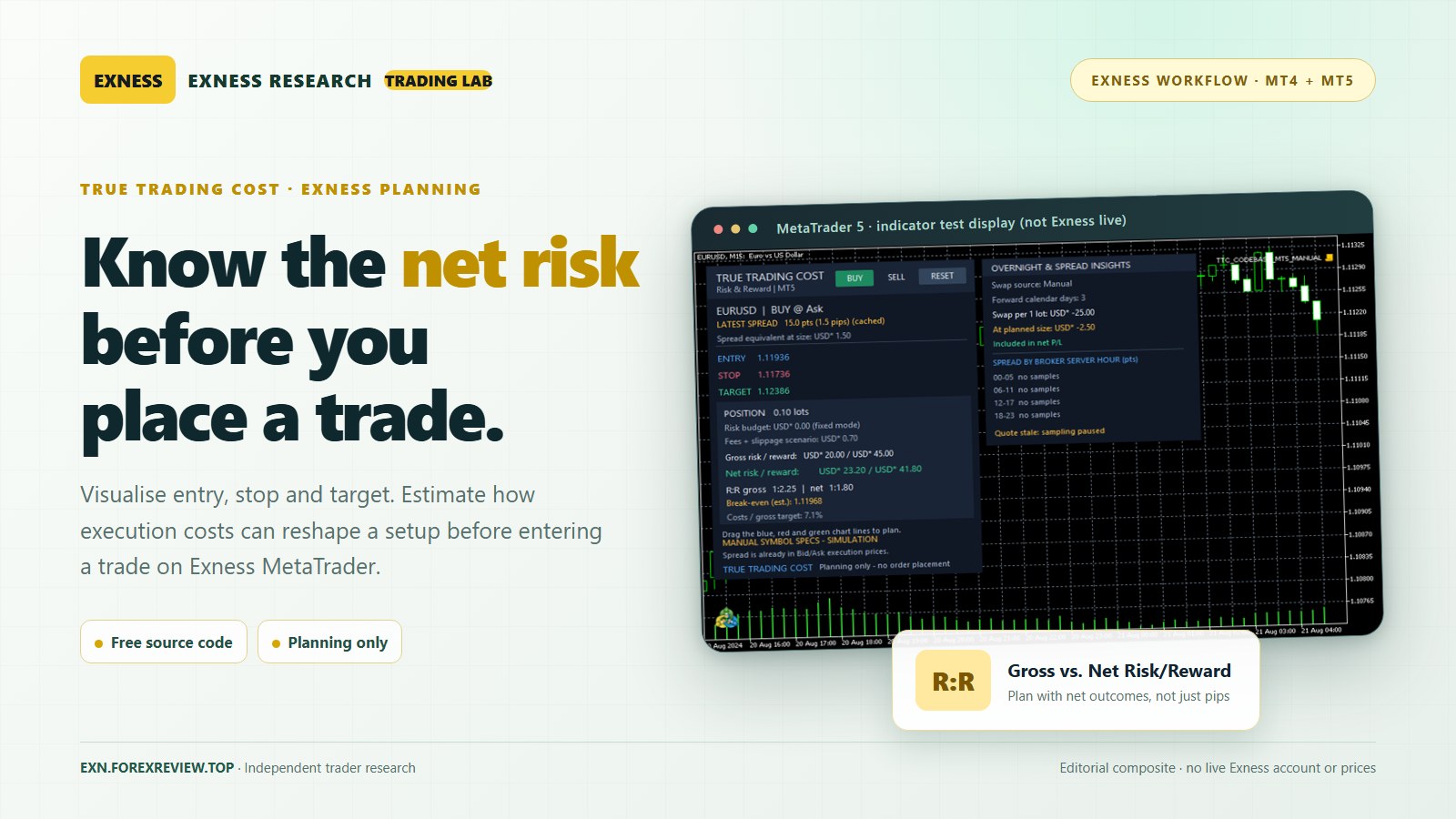
True Trading Cost – Net Risk Reward Calculator is a free, source-included indicator for MetaTrader 4 and MetaTrader 5. Instead of asking only whether a target is twice as far away as the stop, it estimates what that trade could mean in account currency after the costs you have specified. Used with an Exness desktop MT4/MT5 account, it provides a useful second opinion before an order is sent—not a trading signal or an order-execution system.
What the indicator adds to an Exness trading plan
Most traders already mark an entry, stop-loss and take-profit. The difficult question comes next: how much money is actually at risk once the position is sized and the relevant charges are considered? True Trading Cost places draggable Entry, Stop and Target lines on the chart and estimates gross risk, net risk, gross reward, net reward, break-even price and net reward-to-risk. It can suggest a lot size against a percentage-of-equity risk budget or examine a fixed position size.
The developer's MT4 version and MT5 version are published in the MQL5 Code Base. Both are chart-based planning indicators. Pressing BUY or SELL inside this tool establishes a hypothetical plan; it does not send a trade to Exness.
That distinction matters. An indicator can make your assumptions easier to inspect, but it cannot turn an uncertain market into a guaranteed result.
Why it is especially useful when comparing Exness account types
Exness offers different ways to pay for execution. Its Standard account range uses a spread-based, commission-free structure, while its professional account range includes Raw Spread and Zero accounts with trading commissions. Exness also lists Pro as a commission-free account. Actual trading conditions depend on the account, instrument, entity and market.
This is where looking only at the smallest advertised spread can be misleading. A Raw Spread quote may be tighter than a Standard quote, but the commission must be included when assessing the total outcome. Conversely, entering an invented commission on a commission-free Standard setup makes that plan less accurate—not more cautious. The sensible comparison is the estimated net result for the same instrument, volume, stop and target, using each account's current contract information.
For a deeper comparison, see our research on Exness Standard vs Raw Spread trading costs and the broader breakdown of Exness spread, commission and overnight swap.
Three chart lines, one financial decision
After attaching the tool to a desktop MetaTrader chart, choose a hypothetical BUY or SELL. The blue Entry line marks the expected opening level; the red Stop line represents the planned adverse exit; and the green Target line represents the intended favourable exit. Move any line to see the estimated cash risk and reward change.
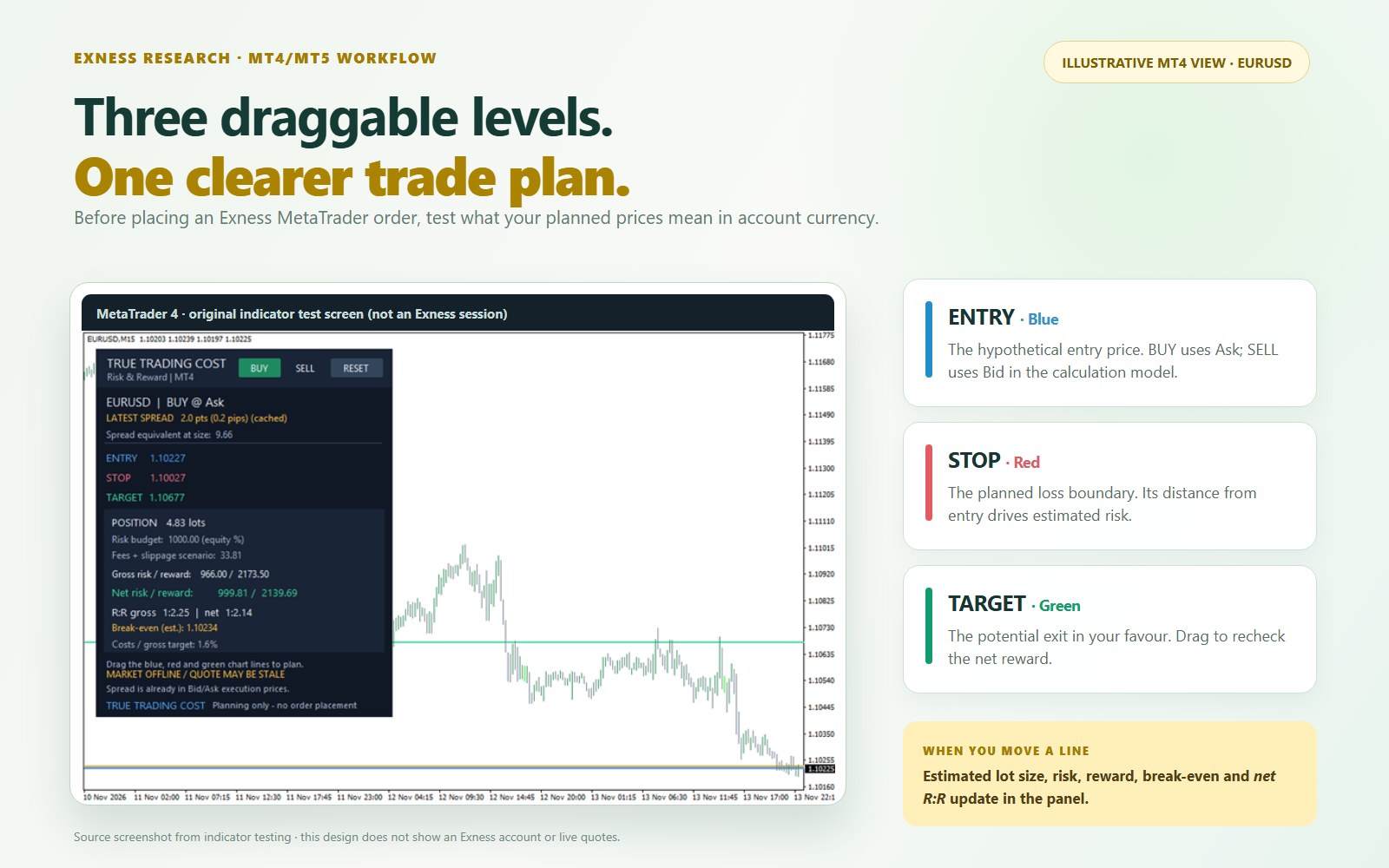
Unlike a simple pip-distance ruler, the indicator is designed to translate the plan into account-currency amounts using the broker-reported tick size and tick value. It also shows a cost-adjusted break-even level. This is particularly helpful when the target is small enough that a fee could materially reduce the expected reward.
Enter commissions correctly, without counting the spread twice
On Raw Spread or Zero, check the applicable commission in the Exness contract specifications or Personal Area for your particular symbol and account. The True Trading Cost commission input expects a round-trip amount per standard lot in account currency. For example, if a specific instrument charges $3.50 per lot on entry and another $3.50 on exit, the input is $7.00 per lot—not $3.50. This is an example of how to convert a per-side quote, not a claim that every Exness instrument costs $7.
Exness explains that commission on applicable account types can be charged for both sides when an order is opened. Verify the published amount rather than taking a generic forex rate from a comparison website. Its official trading-calculator guide also notes that spread estimates use previous-day averages and may differ from execution-time costs.
Do not add the spread twice. The indicator models a BUY using an Ask entry and Bid exit, or a SELL using Bid entry and Ask exit. That price difference already reflects spread. Although the spread may appear as a separate dashboard observation, you should not manually charge it again as an extra fee. Add only genuinely separate commissions, other charges and your estimated slippage. For dynamic spreads, refresh the plan when market conditions change.
Worked example: why a 2:1 setup can become 1.88:1
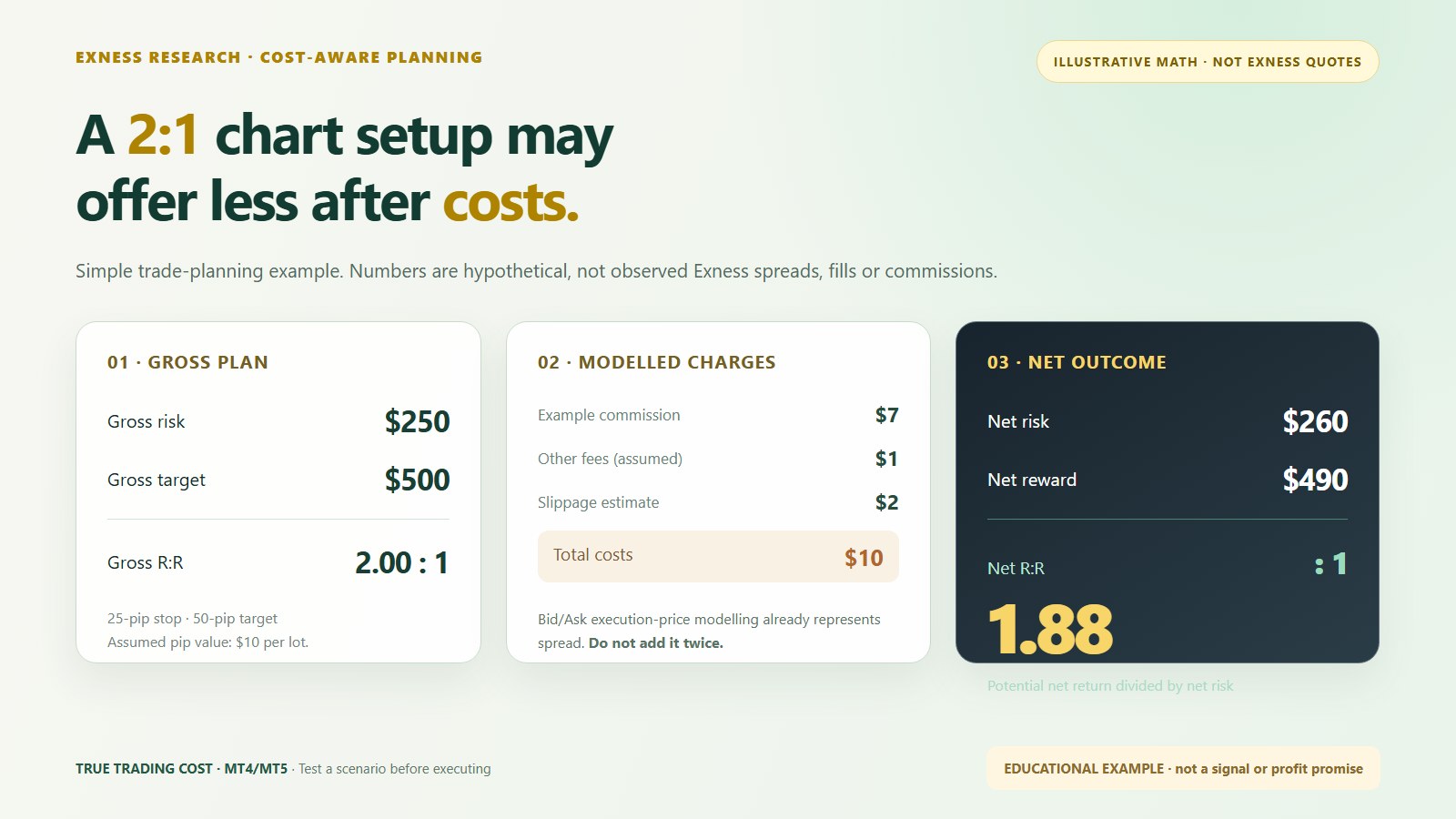
Imagine an illustrative EURUSD BUY in a USD-denominated account. The executable entry and exit levels imply a 25-pip stop and a 50-pip target. At an assumed pip value of $10 per standard lot, the gross risk is $250 and the gross reward $500. That looks like a 2:1 reward-to-risk trade.
Now suppose the plan includes a hypothetical $7 round-trip commission, $1 in other genuine fees and $2 in estimated slippage per lot. Together, these separately modelled costs total $10. No additional spread charge is inserted because the executable entry and exit prices already account for it.
| Planning metric, 1 lot | Illustrative value |
|---|---|
| Gross risk / gross reward | $250 / $500 |
| Separately modelled costs | $10 |
| Net risk / net reward | $260 / $490 |
| Net reward-to-risk | 490 ÷ 260 ≈ 1.88:1 |
For an equity balance of $10,000 and a 1% risk limit ($100), the theoretical size would be $100 ÷ $260, or about 0.3846 lot. If the permitted increment is 0.01 lot, rounding down to 0.38 lot produces a modelled risk of $98.80 and potential net reward of $186.20. Real fills, currency conversion, slippage and gaps can change the outcome; a planned stop-loss does not guarantee a maximum loss.
Using it for XAUUSD and news-sensitive trades
Gold traders have another reason to inspect the calculation rather than reuse a forex template. XAUUSD contract size, tick value, price precision and the broker's symbol settings may differ from a currency pair. A stop that looks small in dollars can still represent substantial account exposure at the chosen lot size. Cross-check the displayed tick value, contract details and volume rules in Exness MetaTrader before relying on any monetary estimate.
Our XAUUSD lot size and margin examples explain the mechanics separately. For volatile releases, also consult our Exness news-trading risk guide: spread widening, execution slippage and higher margin requirements can make a carefully drawn plan behave differently in the market.
What about swap, break-even and spread observations?
True Trading Cost also includes optional overnight-swap assumptions, a break-even estimate and a short-term spread-observation panel. Those features are helpful for planning, but they need interpretation. Swap treatment can depend on the symbol, direction, calendar and account eligibility; automatic swap support differs between MT4 and MT5 and may require verified manual settings. Estimated slippage is a scenario assumption, not a promise about the next fill.
The spread-observation panel can summarise distinct incoming quotes by broker-server time blocks after the indicator starts. It is not a comprehensive historical database, and a handful of observations should not be used to declare one Exness account cheaper in all conditions. For broker-provided figures, cross-check the Exness trading calculator and current symbol specifications.
How to install True Trading Cost on Exness MT4 or MT5
- Download the appropriate source-included file from the official MQL5 Code Base: MT4 (.mq4) or MT5 (.mq5).
- Open the desktop MetaTrader terminal connected to the intended Exness account, then select File → Open Data Folder.
- Place the file under
MQL4/IndicatorsorMQL5/Indicators, open it in MetaEditor, compile, and refresh the Navigator if needed. - Attach the indicator to the instrument chart. Confirm account currency, actual contract specifications, round-trip commission if applicable, extra fees, swap assumptions and a sensible slippage estimate.
- Select BUY or SELL within the indicator and drag Entry, Stop and Target to explore the plan. Inspect the proposed lot size, net risk/reward and break-even before deciding whether to use the broker's actual order ticket.
This installation workflow is intended for desktop MetaTrader, where custom MQL indicators can run. Do not assume that an .mq4 or .mq5 file can be installed inside Exness Terminal's web interface or a mobile app. Our Exness platform comparison covers the practical differences.
Limits worth respecting before any live trade
The calculator cannot foresee a future spread spike, rejection, partial fill, price gap, funding-rate change or the precise conversion rate applied at settlement. Incorrect contract values or a mistaken commission input will produce misleading output. It does not open orders, place stop-losses, manage margin or guarantee a profitable setup. Use it as a pre-trade checklist alongside the terminal's live quote, contract specifications, free margin and your own trading rules.
If you want the developer's full explanation of the calculation model, see the original True Trading Cost walkthrough, including how the spread is handled and why gross reward-to-risk can overstate the actual plan.
The practical takeaway for Exness traders
True Trading Cost does not create a trading edge on its own. Its value is simpler: it makes your assumptions visible before you commit money. On Exness Standard, that can mean checking whether the spread still leaves sufficient room to the target; on Raw Spread or Zero, it means making commission part of the decision; on gold or a volatile news session, it means revisiting position size and execution assumptions instead of blindly copying yesterday's numbers.
If you're evaluating Exness for an MT4 or MT5 workflow, you can explore Exness account registration here. Choose the account and instruments that suit your strategy, verify availability in your jurisdiction, and test the indicator on a demo account before using real funds.
Editorial and affiliate disclosure: EXN Research is independent; it is not the developer of MetaTrader or the Exness brokerage service. The registration link may earn the publisher a commission. Leveraged CFD trading carries a high risk of loss. Figures and interface composites above are illustrative, not a representation of live broker conditions or an investment recommendation.


Comments
Post a Comment